
Track job application emails without losing context.
Email is where much of a job search actually moves forward. But those conversations are often buried in your inbox, disconnected from the roles you applied to, and hard to revisit when you need them most.
ApplyArc helps you track job application emails in one place, including recruiter conversations, hiring manager replies, interview coordination, referrals, and other messages tied to a role.
Two roles at one company: which conversation is this?
Fictional example: Alex applied for Customer Success Manager and Implementation Lead at Northstar Labs. A recruiter asks for availability but does not repeat the job title. A shared company name alone is not enough to choose the application.
- Forward that message to your ApplyArc forwarding address. This sends the message, not access to your entire Gmail or Outlook mailbox.
- Read the message alongside the suggested match. If it is wrong, choose the right role in "Change linked application" and use "Update linked application".
- Check the requested next step, such as sending availability. If you generate a reply, review and edit the draft before using it.
Forwarding and application history are included in Free. AI interpretation and reply assistance depend on your plan and allowances, with broader access during the 14-day Pro trial and on Pro. Separately, enabled automation rules can update stages; review your settings. Check plans.
Why job application emails are hard to manage
- Conversations are spread across threads and inbox folders
- You lose track of which role an email relates to
- Follow ups rely on memory instead of visibility
- Important details get buried over time
Not just recruiter emails
People often think of this as recruiter email tracking, but not every important message comes from a recruiter.
A real job search includes messages from hiring managers, coordinators, founders, referrals, and automated hiring systems.
These emails often lead directly to interviews, follow ups, and decisions.
How ApplyArc tracks job application emails
- Forward emails into ApplyArc
- Review suggested matches and link each email to the right application
- Keep the conversation attached to the role
- Turn emails into clear next steps
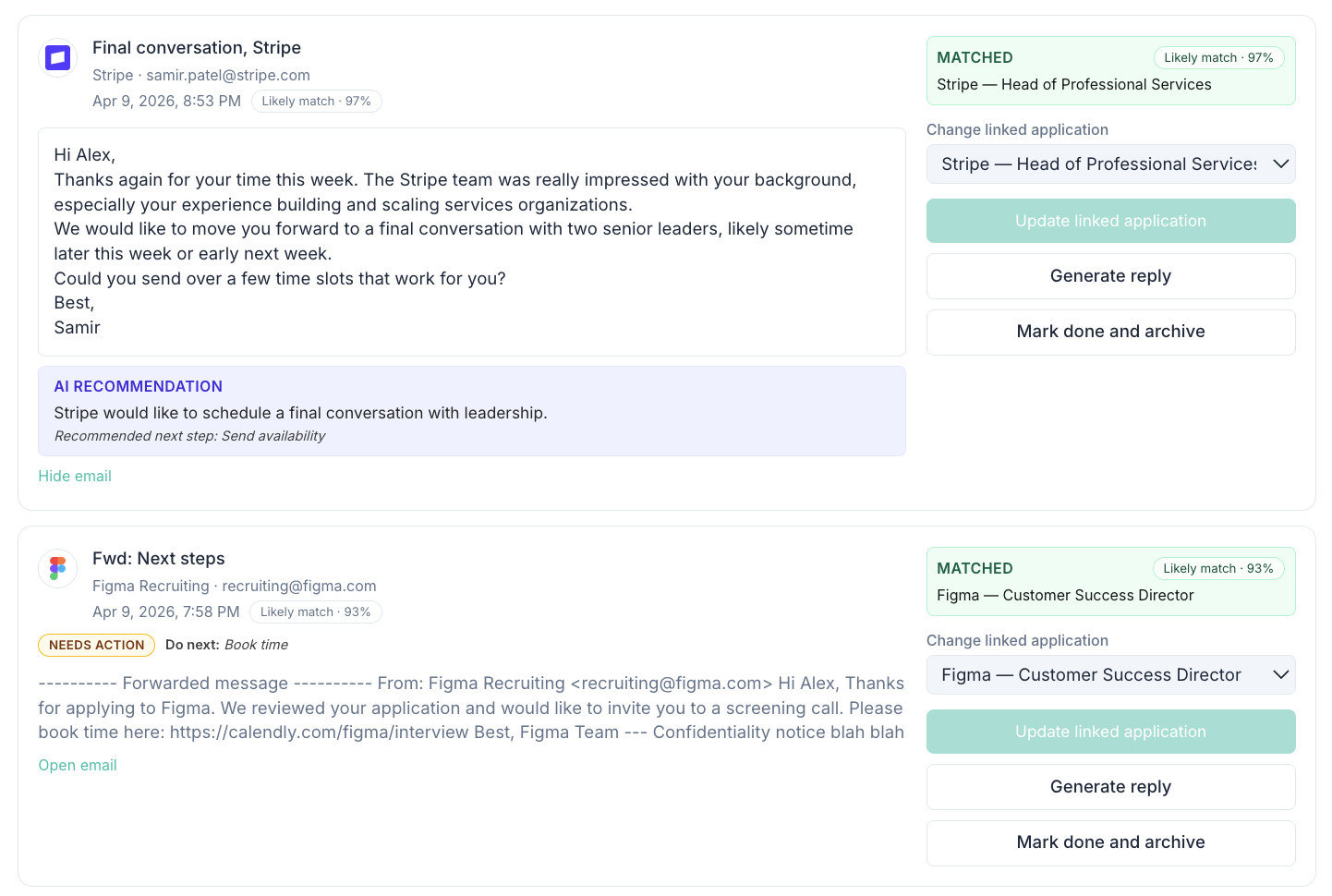
Actual product screen showing linked-application correction and reply controls. A likely-match percentage is a suggestion, not proof that the selected role is correct.
What an email tracker for job applications should give you
- Emails connected directly to each job application
- Clear visibility into ongoing conversations
- Notes and context that stay attached
- Next steps that are easy to act on
Inbox alone vs a job application email tracker
Using your inbox alone
- Use folders, labels or links to relate messages to roles
- Maintain your own reminders and next steps
- Hard to track multiple conversations
- Context gets lost over time
Using ApplyArc
- Emails linked to each role
- Context stays attached
- Next steps remain visible
- A clearer view of your search